Skytools 4 Review
Description of problem: There are two 'problems' that SkyTools 4 has solved for me. The first is determining what objects to observe or image on any given night. The second is documenting my observations and imaging data.
There is a 3rd aspect of SkyTools that I find very useful.
SkyTools is able to interface directly to your telescope mount. You can utilize SkyTools to slew your mount to any desired object.
This is especially useful when trying to observe or image a comet.
Description of software: SkyTools 4 is a software package from 'Skyhound' (Skyhound.com). There are actually two versions, one for visual observations, and one for imaging. The SkyTools 4 Visual Professional software is $179.95 and the SkyTools 4 Imaging software is S199.95.
You can also buy the bundle of both the visual and imaging packages for $249.95 (as of 2024).
All packages are distributed via digital download from the Skyhound.com website.
Installation: Once you download the software from Skyhounds.com all you need to do is run the installation file.
After you install the software the first thing you should do is update the 'Setup' with your equipment information. You simply select the equipment that you own such as telescope(s), mount(s), eyepiece(s), and camera(s).
You can create multiple configurations of equipment. You also setup information such as location, obsevers and other preferences.
All of this information is utilized to configure the software for your personal use.
How used: I use both the visual and imaging software packages for all of my observing/imaging sessions.
The 'observing list' (or 'Target List') is a list of a particular object type such as Messier Object, NGC Object, galaxy, comet, etc. The list includes all of the information for each object type such as RA, DEC, magnitude,
type of object, rise time, transit time, set time, etc.
You can customize the data that is presented. Both versions have a set of tools that allow you to develop your own 'lists'.
For instance, I have a list for all Messier Objects, a list for all NGC Objects, a list for all IC Objects, a list for all Sharpless Objects, and a list that includes all Messier, NGC, IC, and Sharpless objects.
There is also a list for all planets. There is a default list called 'Current' which includes, comets, minor planets, and supernova. Everytime you turn on SkyTools, the 'Current' list is updated.
Developing your own list is very simple, simply invoke the Database Power Search and select the object types you want in the search. You can then refine the search based on magnitude range, constellation, etc. Once you run the search you then copy the selected objects to a user defined list.
Operation: Both SkyTools Visual and SkyTools Imaging have extensive capabilities. In order to keep this review reasonably short, I am going to concentrate on the capabilities that I utilze most frequently, or are key towards either my visual or imaging sessions.
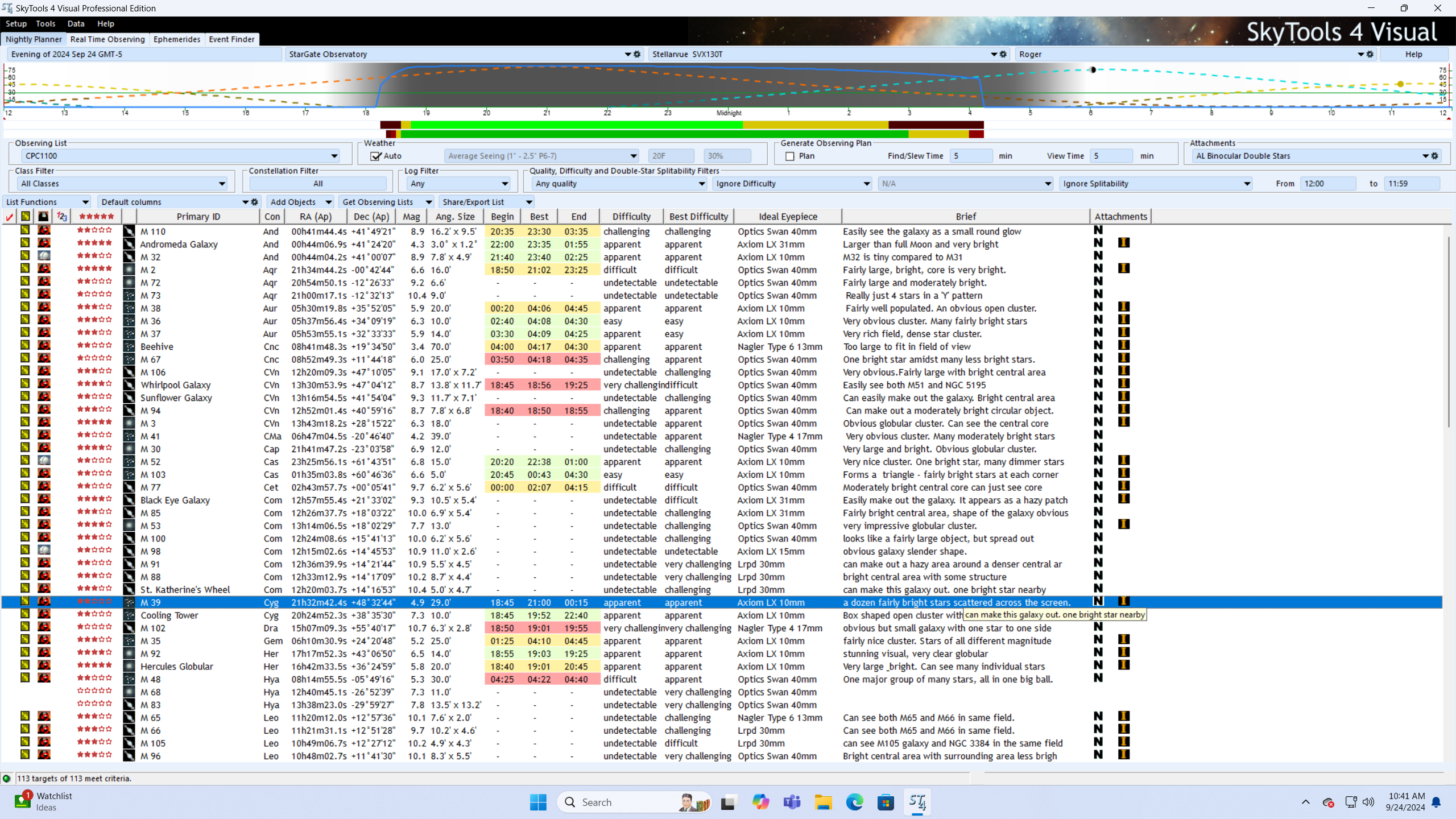
I use the 'Visual' version for two main functions. The first function is to determine which objects are visible for an observing session so I can determine what objects I plan on observing.
The second function is to document all of my observing and imaging sessions.
During the daytime I turn on the Skytools Visual and select (for instance) NGC objects List.
Since SkyTools has been configured with my equipment, it will show all NGC objects that are visible for that night.
I usually set the list to show all items alphebetically by constellation however if I am looking for a particular object I may select to list by object name.
I then scroll down to the constellation that is in a good part of the night sky for that night and look to see what objects are visible.
Since I always use the 'Log' function to record my observations, each object description identifies the objects that I have previously observed along with a rating for each object and a short description of my observation.
I look for objects that I have not previously observed, look at the 'difficulty' rating, and also look at the chart showing how high it is in the sky during the night.
I also look at the chart that shows the path of the object during the night and the path of the Moon since this impacts how bright the sky will be.
From this information I can then determine which objects that I plan on observing on any given night.
SkyTools automatically updates the 'Current' list with updated information on comets, minor planets, etc. If there is a comet that is going to be visible,
I will generally review the 'Current' list and see what comets are visible along with current magnitude and difficulty factor.
I always log all of my visual and imaging sessions. During the visual or imaging session I keep a log book that includes all of the information regarding that session. The next day I transcribe all of the information into the 'log' function of SkyTools Visual.
The data automatically includes information regarding my hardware setup, but also includes environmental data such as temperature, humidity, sky conditions, etc, as well as alignment stars.
Lastly there is a description of the object(s) that I observed and what eyepiece(s) I used. I generally then rate the object. SkyTools uses a 4 star rating system so you just select how many stars to assign to each object.
When I am imaging I include all of the imaging data.
SkyTools Visual keeps all of the logs in a database. This allows you to list/search your previous observing/imaging sessions.
I find this a very useful tool. whenever you create a log for any object, the database is updated and a flag appears on the listing for that object indicating that you have already observed/imaged that object.
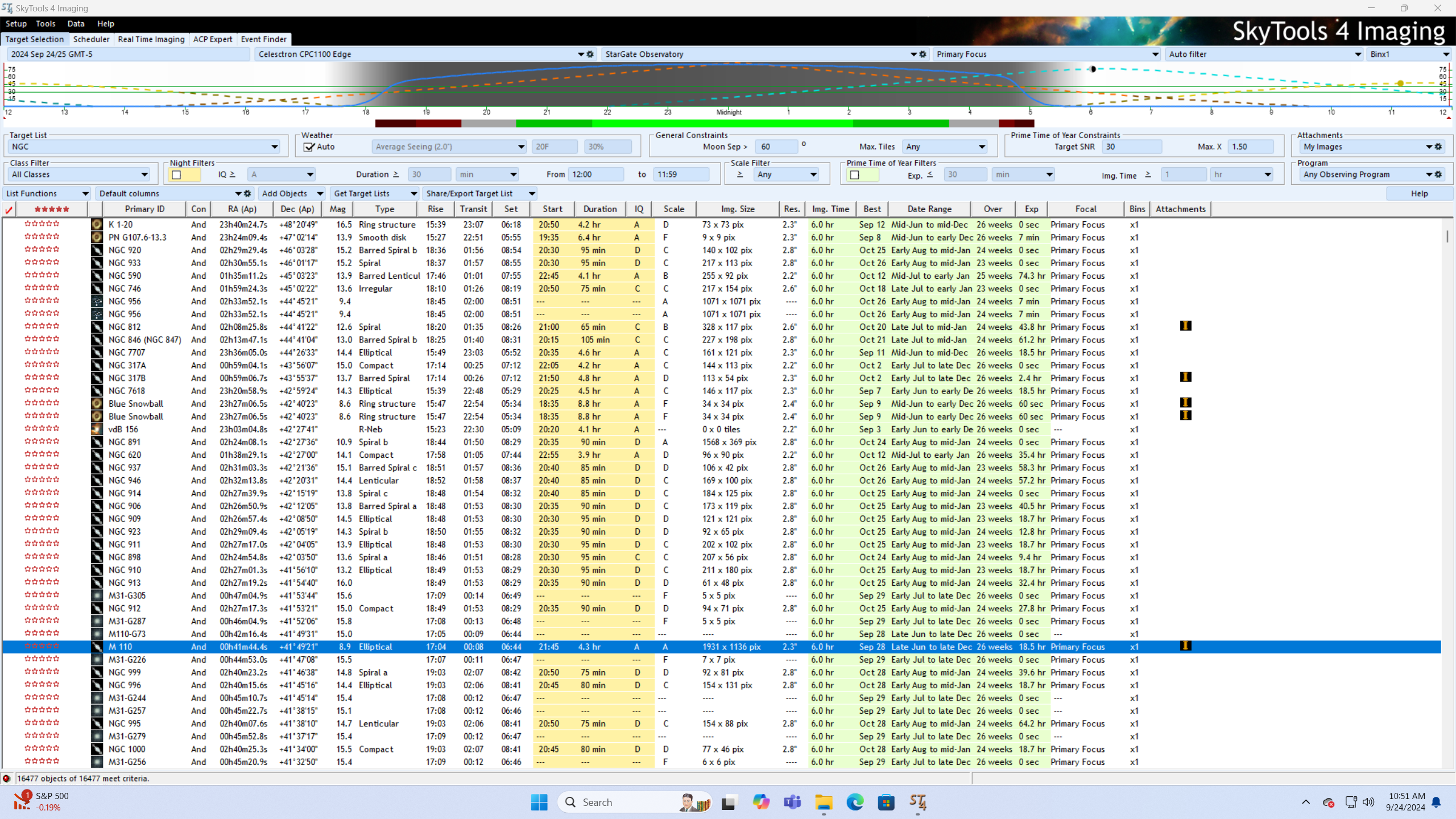
The SkyTools Imaging version is utilized for a different purpose, and that is to determine which objects are suitable for imaging with the current imaging configuration.
My current equipment includes an iOptron CEM120 mount on which sits a Celestron 11 inch Schmidt Cassegrain Telescopee (Edge version), a Stellarvue SVX130 refractor and a Stellarvue SV90 refractor.
SkyTools Imaging is configured with all of the mount, telescope, and camera information.
It utilizes this information to identify most of the same information as SkyTools Visual, and also adds information such as duration, and most important Image size (pixels).
SkyTools Imaging also identifies suggested image time, and best months of the year to image.
The basic operation of SkyTools Imaging is similar to SkyTools Visual. You select a 'Target List' such as 'NGC Objects'.
You also select the equipment you plan on using (which telescope and which camera). SkyTools Imaging then lists all of the available objects.
When I am going to have an imaging session I utilize SkyTool Imaging to help decide which object(s) to image.
I have a 'Target List' that includex all Messier, NGC, IC, and Sharpless objects.
I make sure that SkyTools Imaging is set for the configuration of equipment that I plan on using such as Stellarvue SVX130 refractor and ZWO ASI2600 camera.
I also make sure that SkyTools Imaging has the correct date. If I plan on during a long duration imaging session, I scan down the target list to the constellation(s) that are furthest East at sunset.
I then scan down the list of objects concentrating on the 'Image Size' column. I generally look for objects with at least a few hundred pixels. I click on each object to determine its path through the night sky. I also note the path of the Moon since that greatly impacts sky brightness.
I then make a list of potential objects and compare with my list of already imaged objects.
I then utilize Sequence Generator Pro to platesolve each object to see exactly what the object should look like using the current equipment configuration. I may also use the internet to view other images of the object.
From this I prioritize the potential imaging objects.
Summary: I utilize both SkyTools4 Visual and SkyTools4 Imaging for all of my observing and imaging sessions and find them to be a valuable tool. This review barely touches the surface of the capabilities of both programs.
Support: Greg Crinklaw is the author of SkyTools. He can be contacted directly via e-mail and responds very quickly. There is also a Skytools forum.
Click Below Image(s) for Full Size:
SkyTools 4: Visual Professional
SkyTools 4 Imaging
Click to Return to Home Page